实际用法 #
之前由于某些原因总在家办公,但是有些东西又需要连接到公司的机器上,所以找了一些资料,用 SoftEther 搭建服务器,然后从家里连上公司的办公网,现在将步骤记录一下。
- 首先下载 SoftEther
- 根据 Server 的版本和架构选择相应版本安装
- 配置 SoftEther Server 并使用本地网桥优化性能
安装编译依赖:
apt install make binutils gcc下载安装不细说了,主要记录配置过程。
安装完毕之后,用管理器连接 SoftEther Server
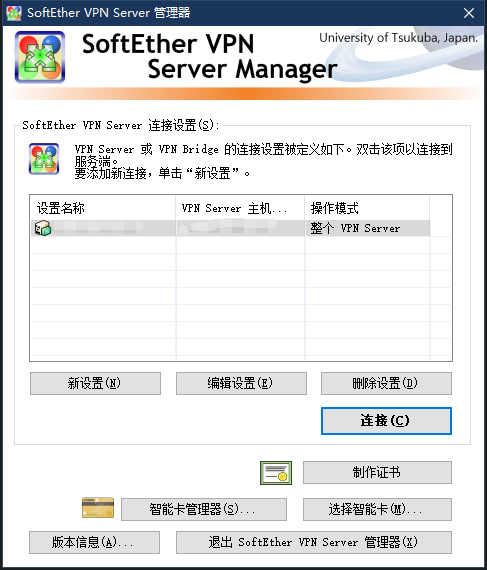
要注意的两点分别如下:
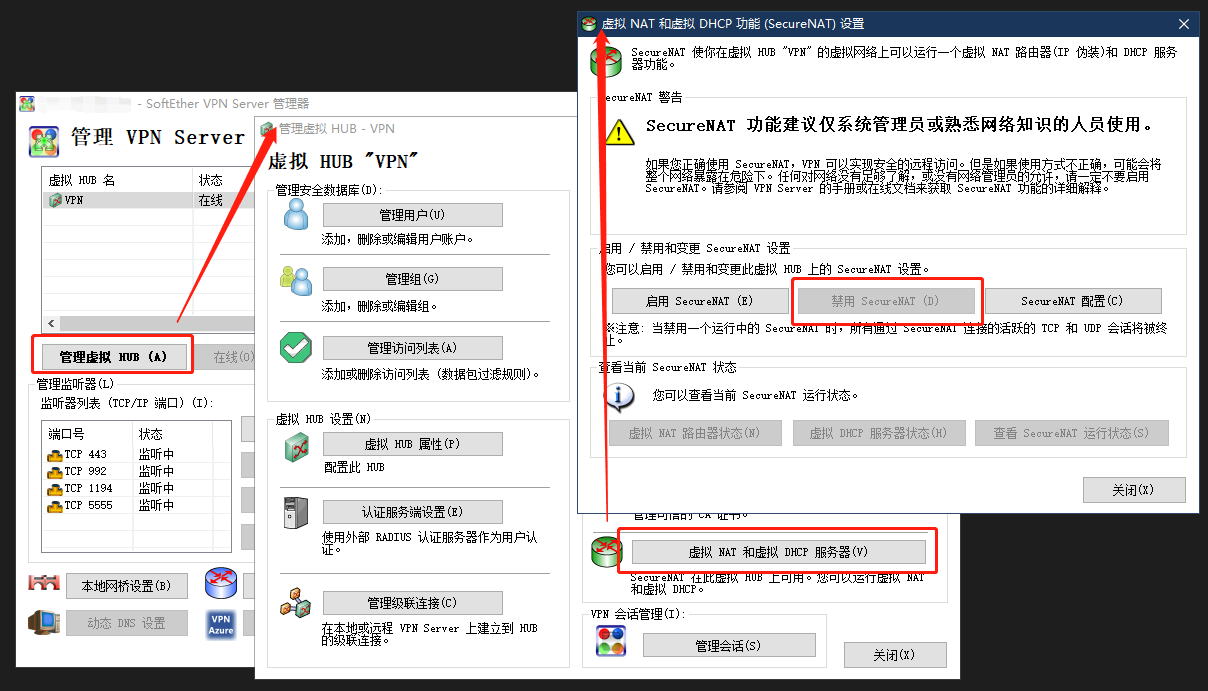
由于要使用本地网桥,所以先禁用 SecureNAT 功能
然后在本地网桥里创建新 tap 设备
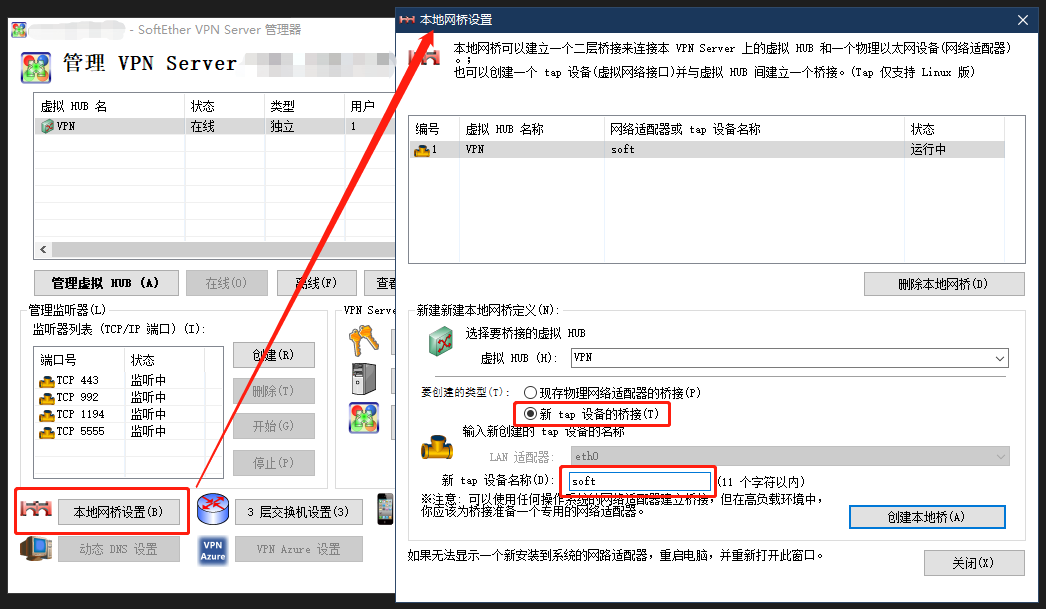
然后回到 Server 的控制台查看:
# ifconfig tap_soft
tap_soft: flags=4163<UP,BROADCAST,RUNNING,MULTICAST>  mtu 1500
        ether 5e:99:af:e9:a9:12  txqueuelen 1000  (Ethernet)
        RX packets 184316  bytes 24147044 (24.1 MB)
        RX errors 0  dropped 0  overruns 0  frame 0
        TX packets 82361  bytes 62678093 (62.6 MB)
        TX errors 0  dropped 0 overruns 0  carrier 0  collisions 0
给 tap_soft 分配 IP 地址:
ifconfig tap_soft 192.168.100.1因为没有启用 SecureNAT 和 SecureDHCP。所以需要安装 DHCP 服务器。
DHCP 服务器有两种可用 isc-dhcp-server 和 dnsmqsq。由于我还要做一些解析,所以选用 dnsmqsq。
安装 dnsmasq,配置 DNS Server
apt install dnsmasq如果是 Ubuntu 18 以上的版本,会提示 dnsmasq 启动失败,是因为系统服务 systemd-resolved 在运行导致的,我们需要停止并禁用它,启用 dnsmasq
systemctl disable systemd-resolved.service
service systemd-resolved stop
systemctl enable dnsmasq
编辑配置文件:/etc/dnsmasq.conf,
# 不读取本地 hosts 文件
no-resolv
# 按照顺序解析,直到解析成功为止
strict-order
# 监听地址
listen-address=211.*.*.*
# 缓存大小
cache-size=10240
# 自定义解析,DNS劫持
address=/lyndi.cn/211.*.*.*
address=/*.cn/211.*.*.*
address=/*.me/211.*.*.*
# 正常的 DNS 服务器地址,用来解析非自定义解析的域名
server=211.*.*.*
server=211.*.*.*
重启 dnsmasq
service dnsmasq restart然后用命令行开启 dnsmasq 的 DHCP Server:
dnsmasq --port=0 --no-resolv --interface=tap_soft --dhcp-range=tap_soft,192.168.100.10,192.168.100.200,12h --dhcp-option=tap_soft,3,192.168.100.1 --dhcp-option=tap_soft,6,211.*.*.*--port=0 禁用 DNS 解析,只启动 DHCP 功能
--no-resolv 不读取 resolv.conf 和 hosts 文件
--interface=tap_soft 绑定到 tap_soft 网卡,只在这个网卡上运行 DHCP Server
--dhcp-range=tap_soft,192.168.100.10,192.168.100.240,12h 分配的 IP 地址池和租约
--dhcp-option=tap_soft,3,192.168.100.1 分配的网关
--dhcp-option=tap_soft,6,211.*.*.* 分配 DNS Server,指定为本机
额外参数:
--no-daemon 不以守护进程模式执行
--log-queries 记录解析日志
--log-dhcp 记录 DHCP 日志
上述参数可以进入调试模式看日志
接下来开启转发,编辑配置文件:/etc/sysctl.conf
net.ipv4.ip_forward = 1重载配置
sysctl -p设置 iptables 转发
iptables -t nat -A POSTROUTING -s 192.168.100.0/24 -d 10.0.0.0/22 -j SNAT --to-source x.x.x.x这里的 x.x.x.x 需要换成 SoftEther Server 的内网地址,这样通过 VPN 拨号连上来之后,通过该地址连入公司内网网段 10.0.0.0/22
iptables -t nat -A POSTROUTING -s 192.168.8.0/24 -j SNAT --to-source x.x.x.x这里的 x.x.x.x 需要换成 SoftEther Server 的公网地址,这一条是解决连上 VPN 之后无法访问外网的问题
机器重启后 iptables 配置丢失的问题可以用 iptables-persistent 解决或者将命令写入 rc.local
为了方便 IOS 设备连接,要开启 L2TP
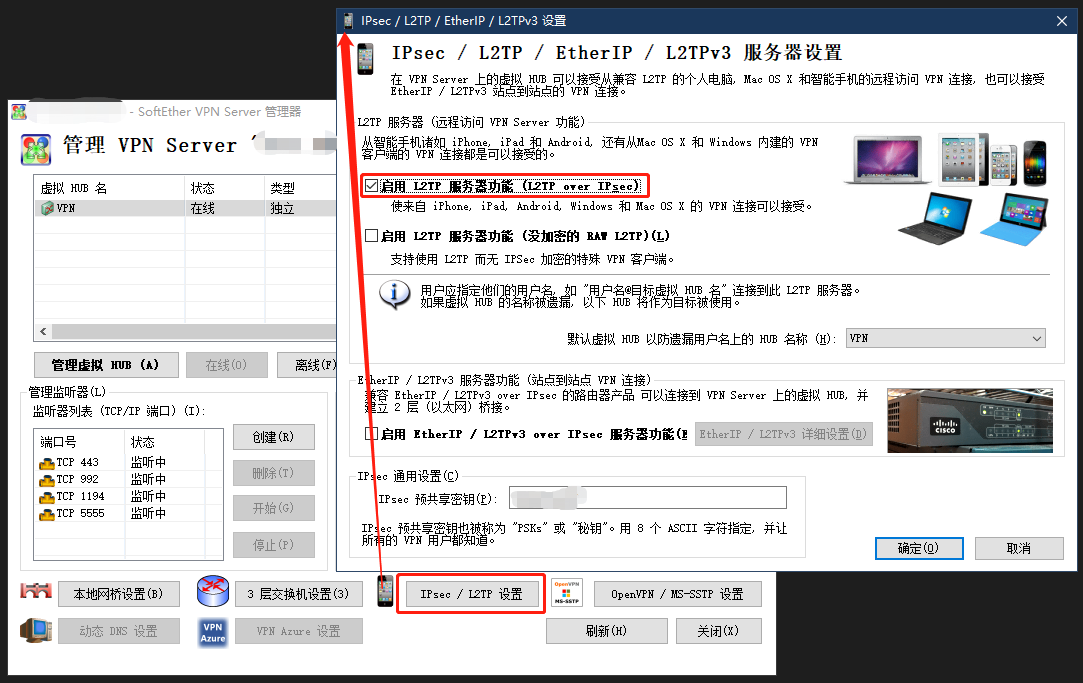
至此,配置完毕,接下来就在管理器里创建账号
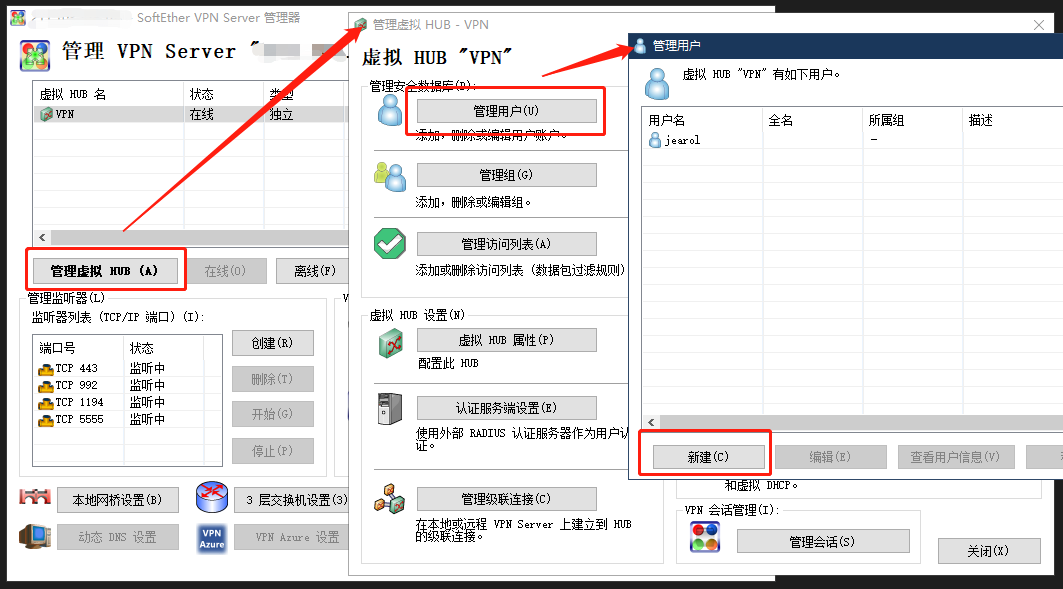
然后就可以创建 VPN 连接,连接到 SoftEther Server ,通过 SoftEther Server 连接到公司内网里了。
在 Windows 里的 VPN 连接需要做如下配置:
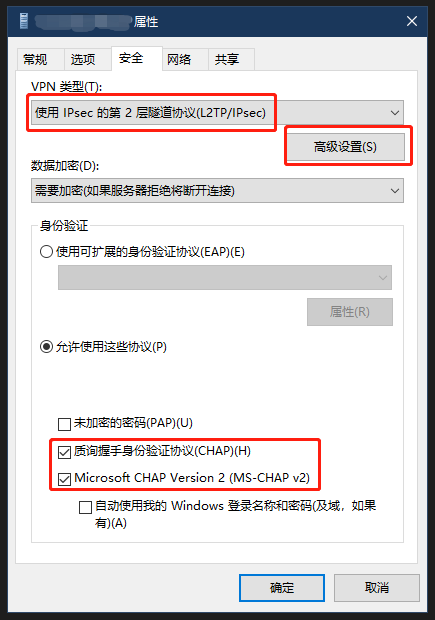
在“高级设置”里填入 SoftEther 中设置的 IPsec 预共享秘钥
最后有其他人做的本地网桥和 SecureNAT 的速度对比,相差还是比较大的。
| 本地网桥 | SecureNAT |
参考资料:
http://blog.lincoln.hk/blog/2013/05/17/softether-on-vps-using-local-bridge/
可以把上述命令写入 rc.local 里,开机自动执行:
其中 10.0.3.254 为服务器内网地址,211.*.*.* 为公网地址
#内网共享上网
iptables -A FORWARD -m state --state ESTABLISHED,RELATED -j ACCEPT
iptables -t nat -A POSTROUTING -s 10.0.0.0/22 -j SNAT --to-source 211.103.128.178
#延迟 15 秒启动 SoftEther,再延迟 5 秒设置 tap_soft 的 IP、添加 iptables 规则,开启 dnsmasq 的 DHCP Server
(sleep 15
/root/vpnserver/vpnserver start
sleep 5
ifconfig tap_soft 192.168.100.1
iptables -t nat -A POSTROUTING -s 192.168.100.0/24 -d 10.0.0.0/22 -j SNAT --to-source 10.0.3.254
iptables -t nat -A POSTROUTING -s 192.168.100.0/24 -j SNAT --to-source 211.*.*.*
iptables -t nat -A POSTROUTING -s 192.168.100.0/24 -o eth1 -j MASQUERADE
#这里是手动启动isc-dhcp-server
#/etc/init.d/isc-dhcp-server start
dnsmasq --port=0 --no-resolv --interface=tap_soft --dhcp-range=tap_soft,192.168.100.10,192.168.100.200,12h --dhcp-option=tap_soft,3,192.168.100.1 --dhcp-option=tap_soft,6,211.*.*.*
)&
Ubuntu 16 之后若要继续使用 rc.local,可先为 rc-local.service 增加
[Install] 段(WantedBy=multi-user.target),再创建 /etc/rc.local、授予可执行权限,
最后执行 systemctl enable --now rc-local。执行启动脚本前应先用
systemctl status rc-local 检查服务状态。
另外附上 isc-dhcp-server 的食用方法:
安装 isc-dhcp-server:
apt install isc-dhcp-serverisc-dhcp-server 有两个配置文件,分别是 /etc/default/isc-dhcp-server 和 /etc/dhcp/dhcpd.conf,
/etc/default/isc-dhcp-server 里设置运行 DHCP Server 的网卡
INTERFACESv4="tap_soft"/etc/dhcp/dhcpd.conf 里设置 DHCP Server 的具体参数
# DHCP 分配的网段和掩码
subnet 192.168.100.0 netmask 255.255.255.0 {
  # 分配的地址池
  range 192.168.100.100 192.168.100.240;
  # 分配的 DNS Server,上边说了我安装了 dnsmqsq,所以设置为本机公网 IP 就行,否则请用实际 DNS
  option domain-name-servers 211.*.*.*;
  # 分配的域的域名,随便设置就好,我用的默认
  option domain-name "internal.example.org";
  # 分配的掩码
  option subnet-mask 255.255.255.0;
  # 分配的网关
  option routers 192.168.100.1;
  # 分配的广播地址
  option broadcast-address 192.168.100.255;
  # 默认租期秒
  default-lease-time 86400;
  # 最大租期秒
  max-lease-time 604800;
}
然后重启服务
service isc-dhcp-server restart为了保证 DHCP Server 在 SoftEther 启动之后,本地网桥 tap_soft 出现之后再启动,需要去掉它的自启动:
systemctl disable isc-dhcp-server